Showing posts with label SEO-Facebook. Show all posts

Tuesday, May 13, 2014

SEO Tips 3 for Facebook Page add other Social Networks Tabs

SEO Tips 3 for Facebook Page add other Social Networks Tabs

SEO Tips 3 for Facebook Page add other Social Networks Tabs
Add Social Tab  for Facebook Page

Add Other Social Network Tabs For Facebook Fan Page

Facebook Become Now more than social network,now it,s became  rich field for Business,Even  this business for  Personal or Companies ,Create page is one of business filed that can affiliate to your works,business and Personal.
Many Facebookers build pages but not rich With  others Social Networks ,or they did not know how to add others Social Networks in Facebook Page.
Adding Other social Networks In to Facebook Page or Facebook Page in other Social Network,
Add Competent Benefit Which one  Of Social  Media Marketing,Make Your Visitors Comfortable when they Need To Read or Shares Info with Their Friends. So Here  I will to Learn How It Easily add Social Network to Your Facebook Fan Page? As Previous Image  Show Pinterest Tab ,+google Tab ,Flickr Tab,Twitter Tab and soon


How to Add Pinterest Tab  for facebook Page?

To add Pinterest Tab Visit this  link and follow these steps to install the tab on your facebook fan page

or copy this linke: https://apps.facebook.com/pinterest-tab/

Step By Step Add Pinterest Tab follow steps as image show

Step By Step Add Pinterest
Press Install Application

Next Step in add pinterest tab is choose which page or pages would  you likes  to add Tab
add pinterest tab is choose which page or pages
Choose Page or Pages to add tab to it
Change Pinterest account and Put your account to show your pins image
Edit admin settings to put your pinterest account
Change Pinterest from administration to your pinterest name account.and change pin mode to user mode.
as image shown.

Change pinterest account name to yours and choose user pin mode
Final Save Settings.
and you got the pinterest on your  account

How To add Instagram Tab to Facebook fan page?

To add Instagram Tab for Facebook page press previous link and follows Previous pinterest steps by steps
To add Twitter Tab for Facebook page press previous link and follows Previous pinterest steps by steps
To add Flicker Tab for Facebook page press previous link and follows Previous pinterest steps by steps
To add youtube Tab for Facebook page press previous link and follows Previous pinterest steps by steps

Finally this my facebook page look with more than 10 social network tabs

SEO Tips 3 for Facebook Page add other Social Networks Tabs
Facebook page tabs

================================================================
For Follow Me 
Twitter: @aalmahallawi

Ahmed Ata Almahallawi
IT Help Desk,
SEO Expert ,PHP,C#,ASPX
Al alami st
gaza -jabaliaGaza Strip
Palestine
Email :ahmed.almahallawi@gmail.com
DOB: 05/10/1984
by +Ahmed Almahallawi 

12/05/2014


Wednesday, May 7, 2014

SEO tips 2 for facebook page Add Keywords

SEO tips 2 for facebook page Add Keywords


How to Change Facebook Page Settings?

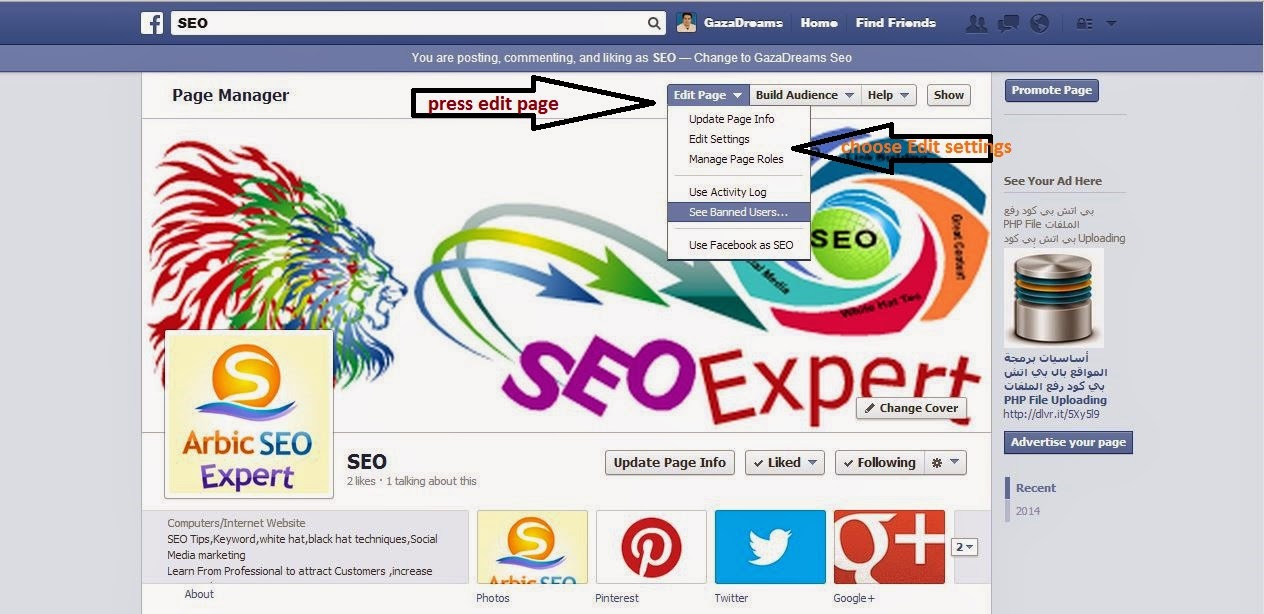
- Before adding  Keywords to Your Page,we need to edit settings to make your page public and appear when users like pages similar to your page.
- From your facebook page Scroll bar to down just little, there is hidden bar appear contain tab named Edit Page press it,it will drop menu choose Edit Settings then will take you to page similar to previous image.Start Editing Settings.

    • Page Visibility

    This will Publish  your Page,If you  have Page not ready you can changed to unpublished.

    • Posting Ability

    I Recommend To make ability to anyone,this help to spread your page.any posting by other can conflict your page just go to his profile and block him.

    • Post Targeting and Privacy

    Do not Turn It ,Because People love public post to see it and read it.

    • Messages

    Choose Allow people to contact my Page privately by showing the Message button,
    Because they will have two choice contact you Privately or Publicly by commenting.

    • Tagging Ability

    Choose Allow others to tag photos posted by SEO Arabian Expert, Because this Will lead Who Tagged and His Friends to your Images in Page.

    • Country Restrictions

    If you Page Focus in Specific Country or Market I Recommended to Put this Country for Example
    Show this Page For People From United States or North America or Middle East.
    others is Hiding this Page From these Countries.
    or do not it,just left it empty with no Restrictions.

    • Age Restrictions

    If you Have Restrictions Like Adult Content Page You Can Make Restrictions in age .

    • Profanity Filter

    I Recommend you to make this Strong Filter Because this affect you later like blocked your page due to contains Racial attack ,and bad words that can hart others.

    • Similar Page Suggestion

    Choose Include SEO Arabian Expert when recommending similar Pages people might like on a Page timeline.the red is my facebook page you will see yours.

    • Replies

    Allow comment it,s increase your pagerank and popularity 

    Where I can Add Keywords in Facebook Page.

    • First pick one Main Keywords and add it in Your Facebook Page Url.
    Read Post : How Can I Change My Facebook Page Name URL To Include My Keyword.
    • From Edit Page Tab,Choose Page Info Tab and Change this.
      • Edit Name : in  this include your Keywords this will appear in your Page under Cover Image, and also in Facebook Search.
      • Category : Choose Category Carefully thats meet your business and page because there is additional info can add depend on your Business Category,this additional info they can Palces to add Extra Keywords in it.
      • Short Descriptions: in this add Short Description for Your Business and Include at least one times your Keywords Short description Must not increase more than 70 - 80 Characters.
      • Company Overview: AS I said Previously If you choose Category Brands & Products and sub is Products and Services this Section will appear,So you can Describ Company and adding Some Valuable Keywords Here.
      • Long Description in this section add all Keywords and every thing Similar and related to your Business.
      • General Information and Mission are Places can you add your keywords.
    • Include Your Keywords in Posts,Comments,sharing.
    Read :What is Keywords and how I get target words?
    =======================================================================
    =======================================================================
    Follow Me.
    Twitter: @aalmahallawi

    Ahmed Ata Almahallawi
    IT Help Desk,
    SEO Expert ,PHP,C#,ASPX
    Al alami st
    gaza -jabaliaGaza Strip
    Palestine
    Email :ahmed.almahallawi@gmail.com
    DOB: 05/10/1984
    by +Ahmed Almahallawi 
    6/05/2014

    Tuesday, May 6, 2014

    SEO tips-tips 1 for facebook fan page - Change Page Name & URL نصائح لتحسين محركات البحث لصفحة الفيسبوك

    SEO tips-tips 1 for facebook fan page - Change Page Name & URL نصائح لتحسين محركات البحث لصفحة الفيسبوك

    SEO tips for facebook fan page


    SEO tips for facebook fan page
    SEO tips for facebook fan page

     choose good name for your page

    if you create page choose good name for your page,some page name may be taken by others so you can  choose one is near your page name.so in this tutorial I jsut takong only the immportan of the url facebook  name.why?because crawls or spiders does not like numbers URL,put name with main your keyword help
    you to increase appearing your page in search Engine.

    How I can change my Facebook Fan page Name?

    If you are already create page,just follow these steps to change your facebook page name as images show.

    First go to your page,press edit tab as next image show.
    How I can change my Fcaebook Fan page Name?
    change facebook url name

    as you see in your page follow arrows in image as shown.
    i will move with you step by step until you change facebook page name.

    Second step
    press on page info tab as next image show.

    step by step to change facebook fan page name
    step by step to change facebook fan page name

    Third step 
    choose edit facebook website address  as image show.

    create web address for this page
    create web address for this page facebook

    press the link create web address for this page.

    fourth step
    the previous step will take you for page to enter your chosen name .
    from pages choose your desired page,in text box for labe facebook web address put your desired 
    name press check availability.if taken change name until found not taken name as next image show.

    check availability facebook page name
    check availability facebook page name
    Final step
    pop page will appear  if your desired name for facebook  page is availability to tell you confirm 
    the name press it,go to your home and press you page and check the url browse in your browser
    next is  confirm your name for facebook page.

    confirm your name for facebook page.
    confirm your name for facebook page.

    how to change my facebook page if i change it previously.

    Remember if you choose the name you will not be able to change it again

    just create new page with desired name.
    =======================================================================

    >>>Next Where I Can Add Keyword In FacePage>>>

    ========================================================================

    If you like post please follow me and like my page in facebook,
    thank you

    Follow Me.
    Twitter@aalmahallawi
    IT Help Desk,
    SEO Arabic Expert ,PHP,C#,ASPX
    Al alami st
    gaza -jabaliaGaza Strip
    Palestine
    Email :ahmed.almahallawi@gmail.com


    نصائح لتحسين محركات البحث لصفحة الفيسبوك

    نصائح لتحسين محركات البحث لصفحة الفيسبوك


    نصائح لتحسين محركات البحث لصفحة الفيسبوك
    نصائح لتحسين محركات البحث لصفحة الفيسبوك

     اختر اسمًا جيدًا لصفحتك

    إذا قمت بإنشاء صفحة ، فاختر اسمًا جيدًا لصفحتك ، فقد يتم أخذ بعض أسماء الصفحة من قبل الآخرين حتى تتمكن من اختيار اسم قريب من اسم صفحتك. لذلك في هذا البرنامج التعليمي ، أنا jsut takong فقط من عنوان url facebook name.why؟ لأن الزحف أو العناكب لا تحب أرقام URL ، ضع اسمًا مع مساعدة كلمتك الرئيسية
    عليك زيادة ظهور صفحتك في محرك البحث.

    كيف يمكنني تغيير اسم صفحة المعجبين الخاصة بي على Facebook ؟

    إذا كنت تقوم بإنشاء صفحة بالفعل ، فما عليك سوى اتباع هذه الخطوات لتغيير اسم صفحة Facebook كما تظهر الصور.

    انتقل أولاً إلى صفحتك ، واضغط على علامة التبويب تحرير كما تظهر الصورة التالية.
    كيف يمكنني تغيير اسم صفحة مروحة Fcaebook الخاصة بي؟
    تغيير اسم رابط الفيسبوك

    كما ترى في صفحتك اتبع الأسهم في الصورة كما هو موضح.
    سأنتقل معك خطوة بخطوة حتى تقوم بتغيير  اسم صفحة الفيسبوك .

    الخطوة الثانية
    اضغط على علامة تبويب معلومات الصفحة كما تظهر الصورة التالية.

    خطوة بخطوة لتغيير اسم صفحة المعجبين على Facebook
    خطوة بخطوة لتغيير اسم صفحة المعجبين على Facebook

    خطوة ثالثة 
    اختر تحرير عنوان موقع الفيسبوك كما تظهر الصورة.

    create web address for this page
    إنشاء عنوان ويب لهذه الصفحة facebook

    اضغط على الرابط لإنشاء عنوان ويب لهذه الصفحة.

    الخطوة الرابعة
    ستأخذك الخطوة السابقة إلى صفحة لإدخال الاسم الذي اخترته.
    من الصفحات ، اختر الصفحة التي تريدها ، في مربع النص الخاص بعنوان الويب labe facebook ، ضع ما تريده 
    اضغط على الإسم تحقق من مدى توفره.

    check availability facebook page name
    check availability facebook page name
    الخطوة النهائية
     ستظهر صفحة البوب ​​إذا كان الاسم الذي تريده لصفحة facebook متاحًا لإخبارك بالتأكيد
     اضغط على الاسم ، وانتقل إلى منزلك واضغط على صفحتك وتحقق من تصفح عنوان url في متصفحك
     التالي هو تأكيد اسمك لصفحة الفيسبوك.
    confirm your name for facebook page.
    confirm your name for facebook page.

    كيف أقوم بتغيير صفحة الفيسبوك الخاصة بي إذا قمت بتغييرها مسبقًا.

     تذكر أنك إذا اخترت الاسم فلن تتمكن من تغييره مرة أخرى

     فقط قم بإنشاء صفحة جديدة بالاسم المطلوب.

    =======================================================================

    >>>Next Where I Can Add Keyword In FacePage>>>

    ========================================================================

    شكرا

    اتبعني.
    تويتر :  aalmahallawi
    مكتب الخدمات،
    خبير SEO عربي  ، PHP ، C # ، ASPX
    شارع العلمى
    غزة -jabalia ،  قطاع غزة
    فلسطين
    بريد إلكتروني: ahmed.almahallawi@gmail.com

    Download As PDF